Templates
Workflow templates are pre-built workflow configurations that you can install into any project. They provide ready-to-use workflows with pre-configured stages, agents, tool assignments, and routing -- so you can start running workflows immediately without building everything from scratch.
What a Template Contains
A template packages a complete workflow blueprint:
| Component | Description |
|---|---|
| Name | Display name of the template |
| Description | What the workflow does and when to use it. Shown in full on the template card (no longer truncated), so keep it short -- a sentence or two. Capped at ~240 characters |
| About this template | Optional. A template-only Markdown note for origin, credits, or context that helps people browsing the library (e.g. where the idea came from, who built it). Separate from the description, and -- unlike the description -- not copied onto a workflow when someone installs the template |
| Category | Grouping label (e.g., "content", "research", "development") |
| Difficulty | Complexity rating: beginner, intermediate, or advanced. Set automatically from the workflow's complexity -- authors don't choose it |
| Blueprint | The full workflow configuration as a JSON object -- stages, assignments, outcomes, routing, hooks, and all settings |
| Metadata | Summary data including agent IDs, stage count, and feature tags |
| Sample Events | A recorded sequence of workflow run events showing how the template executes. Every export ships one; by default it's activity-only (timeline, stages, tool activity, token usage — no content). The run's actual messages and results travel only when the author explicitly chooses full content at export |
Two surfaces: Learn ORQO and the Workflow Library
Templates live on two sidebar pages, split by purpose:
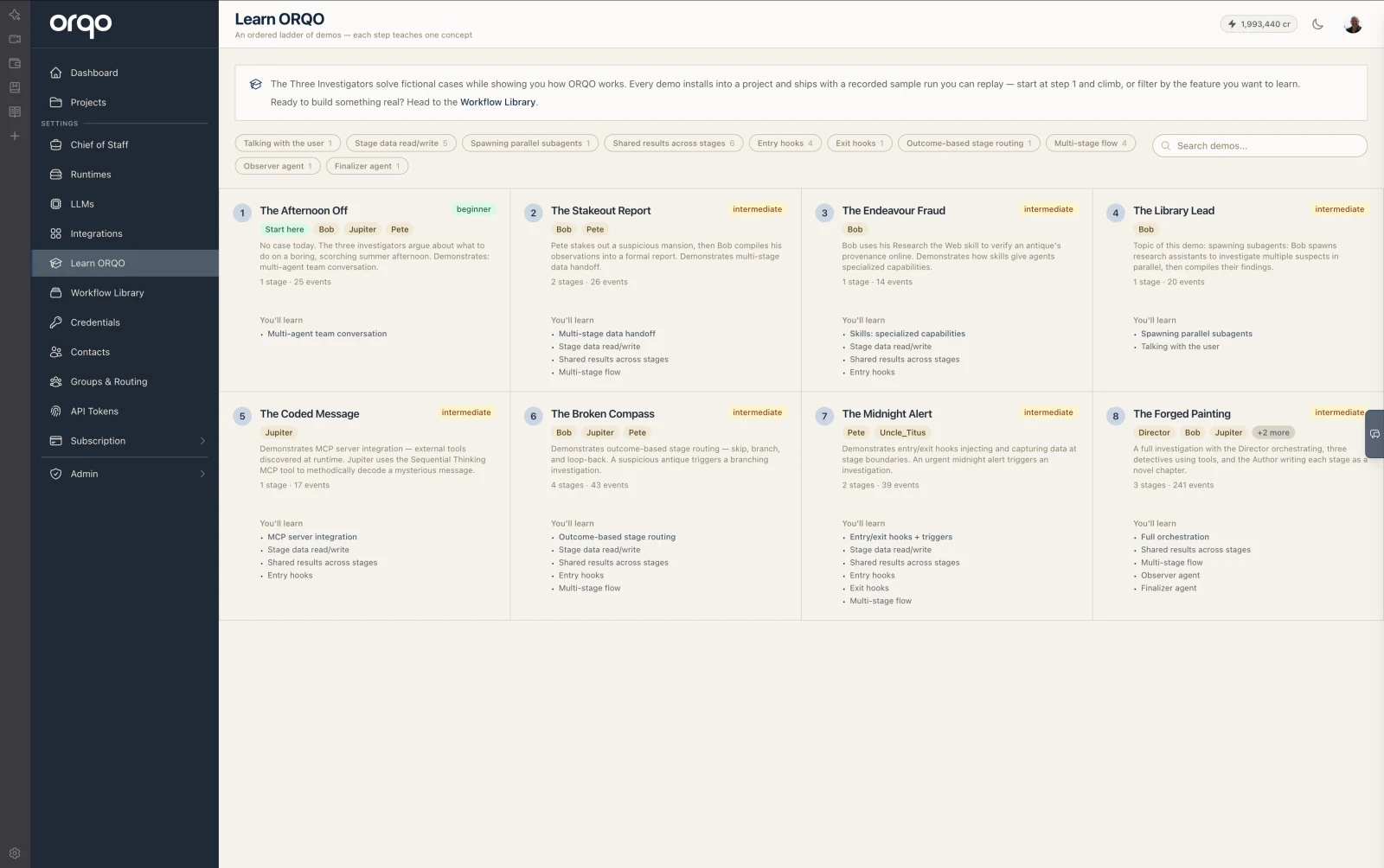
Learn ORQO is an ordered ladder of demo workflows — fictional Three Investigators cases, each step teaching one platform concept. Cards show the step number, a difficulty rating, the agents involved, and a "You'll learn" list of the features the demo explains. Every demo ships with a recorded sample run you can replay for free, and the ladder can be filtered by feature (multi-stage flow, outcome routing, hooks, subagents, …). Start at step 1 and climb.
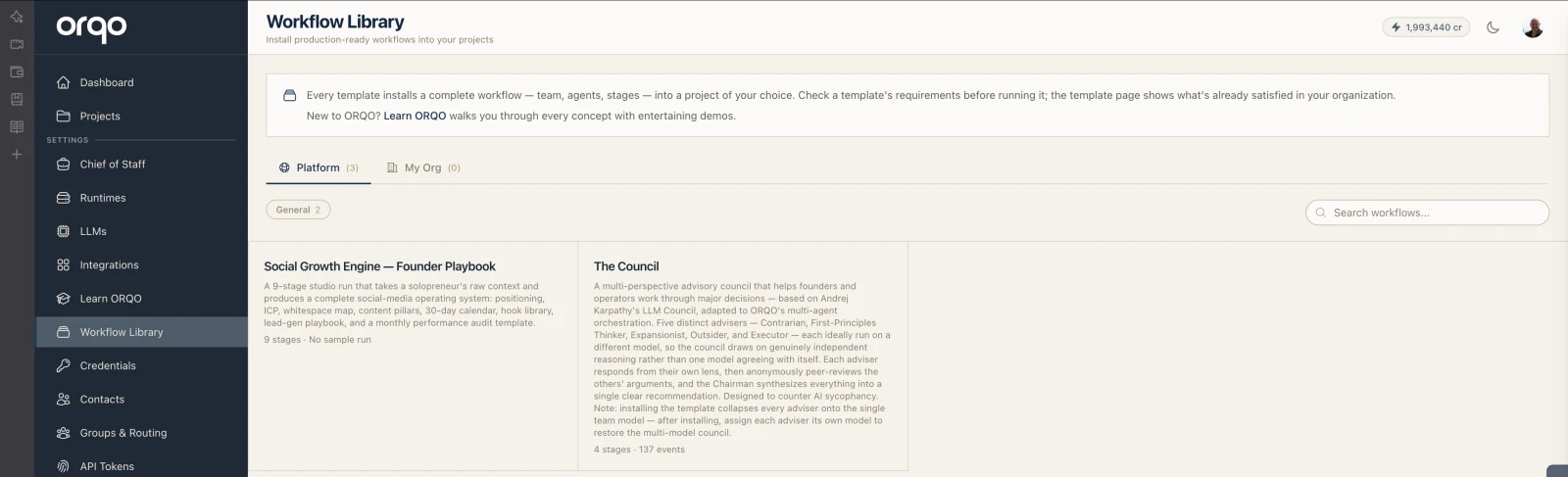
The Workflow Library holds production-ready templates you can adapt to your use case. Cards are deliberately minimal — name, description, stage count, and a "Needs setup" hint when a template requires organization resources — and the library is browsed by category (e.g. General, Marketing, Sales) with a search box. Your organization's own exported templates appear under the My Org tab.
Both surfaces open the same template page, where you review the details and install. Templates are sorted by position (curated order) and then by name.
Template Metadata
The metadata field provides quick-glance information without needing to parse the full blueprint:
| Key | Type | Description |
|---|---|---|
agent_ids | Array of strings | The agent IDs used in the blueprint (e.g., ["Researcher", "Anna", "Editor"]) |
stage_count | Integer | Number of stages in the workflow |
features | Array of strings | Feature tags describing what the template demonstrates |
This metadata powers the template cards in the library browser, giving users a quick sense of the template's scope and complexity.
Installing a Template
When you install a template into a project, the platform:
- Creates a new team with agents matching the template's agent definitions.
- Creates a new workflow with stages, assignments, outcomes, routing, and hooks matching the blueprint.
- Links the workflow to the newly created team.
The installed workflow is a fully independent copy. After installation, you can modify any part of it -- rename stages, change agent perspectives, adjust routing, add or remove tools -- without affecting the original template.
Installing a template creates new resources in your project. It does not create a live link to the template. Future updates to the template do not propagate to installed instances.
What You Need Before Installing
The template page shows a live requirements checklist — everything the template needs, resolved against your organization, with a satisfied/unsatisfied mark and a configure link per item:
- LLM Configuration -- You pick an LLM configuration at install time. Templates do not bundle API keys or LLM configurations since those are organization-specific.
- Integrations -- If the template uses tools provided by an integration (e.g. an MCP server), that integration must be installed in your organization.
- Credentials -- If tools require API keys, the matching credentials must be configured in your organization's settings.
- Documents -- Some workflows declare a minimum number of documents (e.g. a data room to analyze); the target project needs them before a run can start.
Installing never blocks — unmet requirements come along as warnings so you can configure them afterwards. Running does: a workflow with unmet requirements shows a "Before you run" panel naming exactly what's missing (with a fix link per item), and the run won't start until the required items are resolved. The error is the onboarding — you always know the next step.
Sample Runs
Templates can include sample events -- a pre-recorded sequence of workflow run events that demonstrate what the template produces when executed. Sample events let you preview a template's behavior before installing it.
Every export ships the selected run as a sample, in one of two modes:
- Activity only (the default) -- the run's timeline travels: stage transitions, which agent did what, tool activity, and token usage. No content does -- messages, tool parameters and results, stage-result values, and artifact contents are all withheld at export. Safe even for runs on real data whose orchestration is worth showing; the preview marks hidden content as "hidden by the template author".
- Full content (explicit opt-in) -- the run's messages and results are baked into the template and become visible to everyone who can see it. Choose this only for runs that hold no private data (e.g. fictional demo scenarios).
This keeps shared and published templates safe by default: content never travels unless the author deliberately opts in.
Each sample event contains:
| Field | Description |
|---|---|
sequence | The order of the event in the run |
event_type | The type of event (e.g., stage start, agent message, tool call, stage complete) |
data | The event payload showing what happened |
Sample events are displayed in the template detail view, rendered as a simulated workflow run timeline. This gives you a concrete picture of the agents' interactions, tool usage, and outputs.
Template Difficulty
Difficulty is set automatically from the workflow's complexity when you export -- authors don't pick it. It's shown on Learn ORQO cards and on the template page (Workflow Library cards omit it -- there, the category and requirements matter more). The rating helps installers choose templates appropriate to their experience level:
| Level | Description |
|---|---|
| Beginner | Simple workflows with 1-2 stages and straightforward linear execution. Good for learning the platform. |
| Intermediate | Multi-stage workflows with branching, loops, or multi-agent collaboration. Demonstrates more advanced features. |
| Advanced | Complex workflows with sophisticated routing, subagent spawning, hooks, and tool orchestration. |
Field Reference
| Field | Type | Required | Default | Description |
|---|---|---|---|---|
| Name | String | Yes | -- | Unique template name |
| Slug | String | Yes | Auto-generated | URL-friendly identifier (generated from name) |
| Description | Text | No | -- | What the template does. Shown in full on the card; keep it to a sentence or two (~240-character cap) |
About this template (notes) | Text | No | -- | Template-only Markdown note (origin, credits, context). Not copied onto installed workflows |
| Category | String | No | -- | Grouping label |
| Difficulty | Enum | No | Auto-derived | beginner, intermediate, or advanced. Set automatically from the workflow's complexity |
| Blueprint | JSON | Yes | {} | Full workflow configuration |
| Metadata | JSON | No | {} | Summary data (agent IDs, stage count, features) |
| Sample Events | JSON Array | No | [] | Pre-recorded run events for preview |
| Position | Integer | No | 0 | Display order in the library |