Integrations
Everything ORQO can connect to lives in one searchable Integrations browser — Apps, Skills, and MCP servers side by side. Filter by category, switch between your Installed integrations and the full Catalog, or search by name to find what you need.
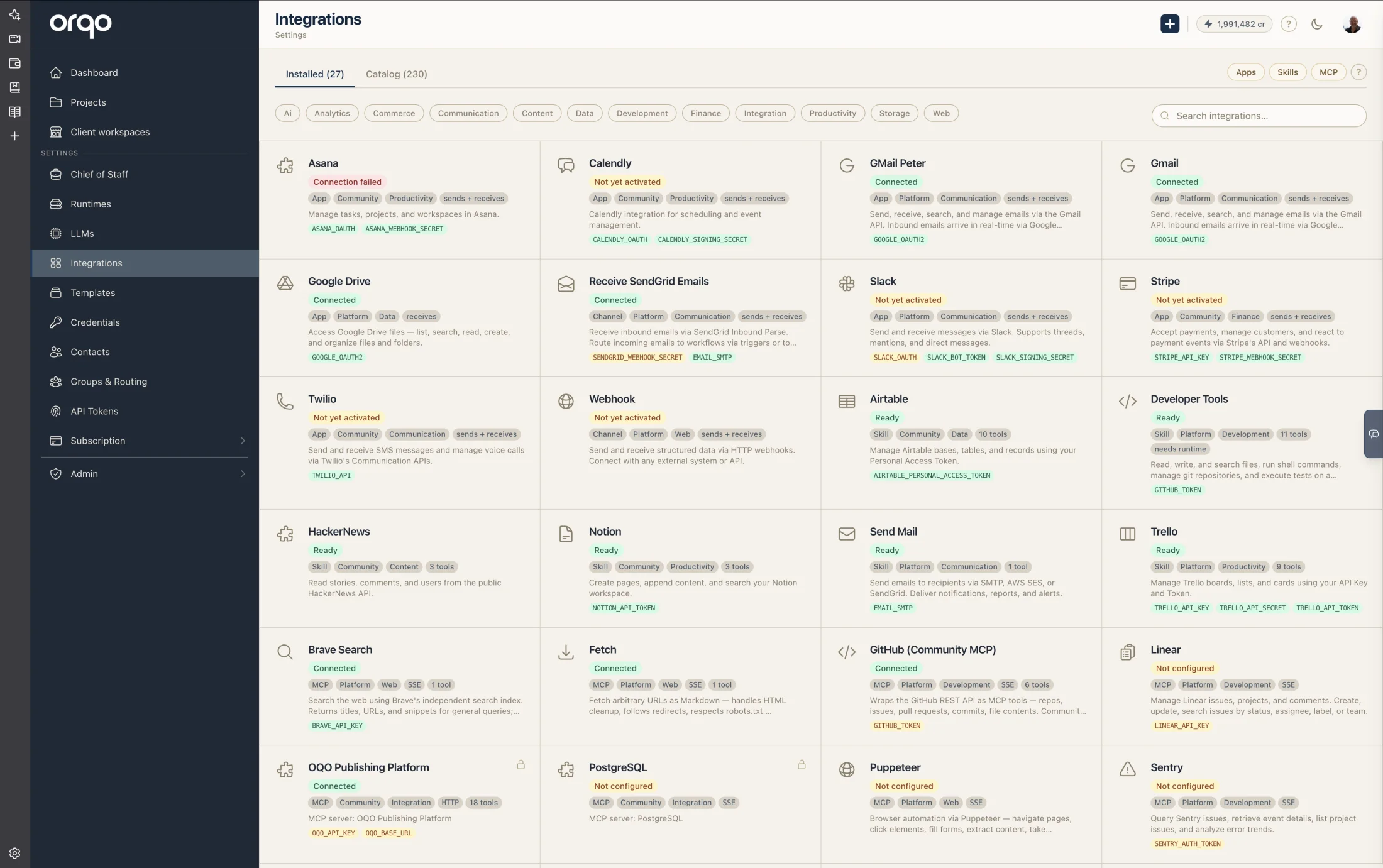
Supported Platforms
ORQO connects to external services through Apps — lightweight HTTP services that implement a standard contract. Each App manages bidirectional communication: receiving events from external platforms and delivering messages back.
A few representative examples of what's available today:
- Slack — team chat with threads, channels, and DMs.
- Gmail — search, read, and send emails.
- Google Drive — list, search, and create files.
- Webhook — a generic HTTP integration for any external system.
The catalog is growing and these are only a sample. Inside ORQO, go to Settings → Integrations to see the full, current list you can install right now — that view is the live source of truth.
A public integrations catalog is planned for a future release.
Beyond the built-in apps, the app system is open — any developer can build and register their own apps.
Built-In Media Processing
Messages received through connected platforms are automatically enriched before reaching Chief of Staff:
- Voice message transcription — Voice messages (push-to-talk recordings from WhatsApp, Telegram, etc.) are automatically transcribed to text, so users can speak their requests naturally.
- Image OCR — Images containing text are processed with automatic text extraction. Chief of Staff receives both the image and the extracted text, enabling accurate quoting and analysis of screenshots, documents, and photos of text.
- Image vision — All images are passed to the LLM for visual understanding.
The Core Idea: Apps as MCP Wrappers
ORQO agents interact with external services through tools — and the standard for tool servers is MCP (Model Context Protocol). An MCP server exposes tools that agents can call: search the web, read a file, query a database.
But standard MCP servers can't do everything. They can't manage OAuth flows. They can't receive webhooks. They can't route incoming messages to the right conversation. They can't handle channel-based delivery (Slack threads, WhatsApp chats, Telegram groups).
Apps are wrappers around MCP servers that handle everything a standard MCP can't. An App adds:
| What standard MCP does | What the App wrapper adds |
|---|---|
| Exposes tools to agents | Tool discovery — fetches and registers the MCP server's tools automatically |
| OAuth — manages token acquisition, storage, and refresh | |
| Webhooks — receives inbound events from the platform | |
| Channels — routes messages to/from contacts on the platform | |
| Delivery — sends agent output back through the right adapter | |
| Credentials — manages API keys and links them to the MCP tools | |
| Manifest — one-click setup from a single configuration URL |
The MCP server is still at the center — it provides the tools. The App wraps it with the infrastructure that makes a real-world integration work end to end. When you register an App, ORQO connects to its MCP server, discovers the available tools, and makes them assignable to agents via Skills.
Build Your Own App
ORQO's app system is designed for third-party developers. An App is a standalone HTTP service that implements ORQO's adapter contract — in any language. Ruby, Python, Go, TypeScript, Rust — whatever you're comfortable with. The HTTP contract is what matters, not the language.
How It Works
- Build your app using a boilerplate template (Ruby/Sinatra or Python/FastAPI) or from scratch
- Host it anywhere — your own server, a cloud provider, a container service
- Register it with ORQO by providing its URL — the platform fetches your app's manifest and discovers everything automatically
- Configure credentials, verify the connection, and your app is live
The entire registration is manifest-driven. Your app serves a manifest.json that describes its identity, capabilities, required credentials, and agent skill template. ORQO reads the manifest, discovers MCP tools, creates credential placeholders, and sets up the integration — no manual configuration beyond filling in API keys.
Three App Tiers
| Tier | Who Builds It | Visibility |
|---|---|---|
| Platform | ORQO team | Ships with ORQO — Slack, Email, Webhook, etc. |
| Public | Any developer | Published in the marketplace, discoverable by all organizations |
| Private | Any developer | Registered directly with a specific organization |
All three tiers use the same technical infrastructure: same manifest spec, same HTTP contract, same MCP tool discovery. ORQO's own platform apps go through the exact same process as third-party apps.
Developer Resources
| Resource | Description |
|---|---|
| Boilerplate repos | GitHub template repositories for Ruby and Python — clone and customize |
| App SDK | Optional libraries that handle protocol boilerplate (manifest serving, MCP routing, credential injection) |
| Developer Portal | Register via GitHub OAuth at /developer/, manage your app listings, submit for review |
| CLI tool | orqo new scaffolds an app, orqo test validates contract compliance |
The App SDK is optional, the HTTP contract is mandatory. You can implement the contract in any language without using an SDK. The SDKs are convenience, not requirements.
Integration Mechanisms
| Mechanism | Direction | Use case |
|---|---|---|
| Apps & Channels | Both | Full bidirectional platform integrations (Slack, WhatsApp, Telegram, etc.) |
| Chief of Staff | Both | AI front desk — receives messages, responds, delegates to workflows |
| Integration Builder | — | AI integration engineer — add new platforms to your org through chat |
| Workflow Assistant | — | AI workflow designer — build, validate, run, and analyze project workflows through chat |
| Tool Builder | — | AI software engineer — write, verify, and save custom Python tools through chat |
| Webhooks | Inbound | Receive events from any HTTP-capable system |
| API | Both | Programmatic access — trigger workflows, receive callbacks |
Security: Contact-Based Access Control
Only registered Contacts can interact with ORQO through messaging platforms. When a message arrives from an unknown sender — someone without a Contact record in your organization — the message is rejected before any AI processing occurs.
This means:
- No unauthorized users can trigger Chief of Staff conversations or workflows.
- You control exactly who can communicate with your organization's AI.
- Contacts must be manually added through Settings > Contacts before they can send messages.
Each Contact can have multiple Contact Channels — one per connected App. For example, a contact might have a Slack handle and a WhatsApp number, allowing ORQO to reach them on either platform.
Apps vs. API
Apps are for platform-to-platform connections with rich features: message parsing, delivery adapters, OAuth flows, and channel routing. Use Apps when you're integrating with a specific platform like Slack, WhatsApp, or Telegram.
The API is for programmatic control. Use it when you want to trigger workflows from your own code, CI/CD pipelines, or monitoring systems.
Both can be used together — an App handles the Slack integration while your API triggers the workflow that produces the Slack message.