Quickstart
Get from zero to a running workflow in minutes. No API keys required — every subscription includes platform credits so you can start immediately.
Don't have an account yet? Sign up at orqo.ooopps.com — free tier includes platform credits, no credit card required.
The fastest way: Start with Learn ORQO
The quickest way to explore ORQO is Learn ORQO in the sidebar — an ordered ladder of demo workflows in which the Three Investigators solve fictional cases while showing you how the platform works. Each step teaches one concept (multi-agent conversation, stage data handoff, outcome routing, hooks, …), lists what you'll learn on its card, and ships with a recorded sample run you can replay without spending a single token.
- Open Learn ORQO — In the sidebar, open Learn ORQO and pick step 1 (or filter the ladder by the feature you want to learn).
- Review the demo — The template page shows the team, stages, and the pre-recorded sample run — every agent interaction, tool call, and result, replayable for free.
- Install to Project — Click Install to Project, pick a project (create one first if needed) and an LLM configuration. Platform-provided configs are available out of the box, backed by ORQO's platform credits — no API key needed.
- Run it — Click Run and watch the agents work. Each stage shows its status and result in real time.
The installed workflow is yours: rename stages, edit agent perspectives, adjust routing, swap models, add tools. It's a fully independent copy you can take apart and rebuild.
Ready for something real? The Workflow Library (also in the sidebar) holds production-ready templates you can adapt to your use case, browsable by category. The template page shows a live requirements checklist — what the template needs (integrations, credentials, documents) and which of those are already satisfied in your organization.
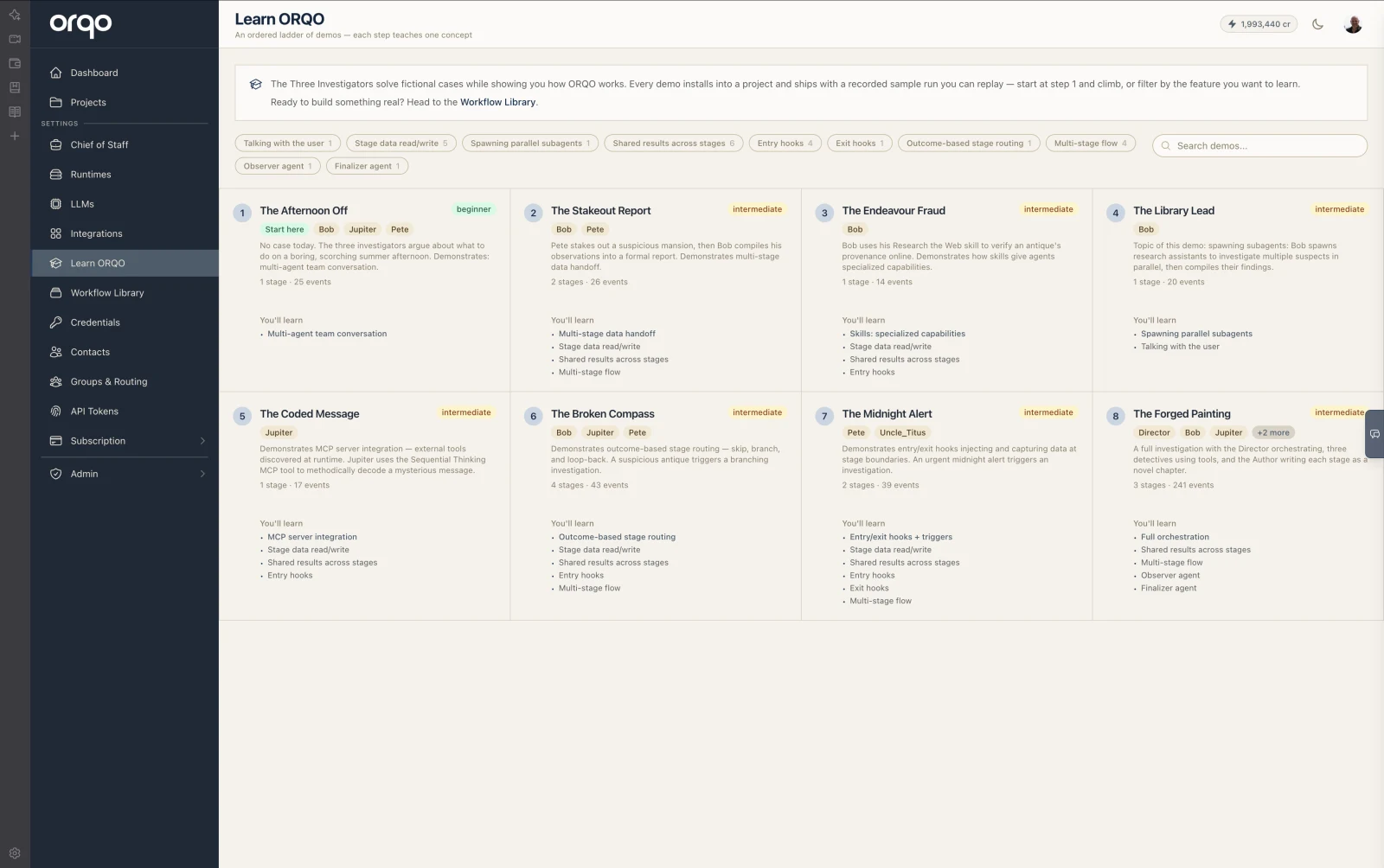
This is the best way to learn how teams, stages, hooks, and routing work together — by seeing a working example and modifying it, rather than building from scratch.
Alternative: Have a Conversation
Don't want to click through the UI? Talk to an AI assistant instead. You can open a dialogue with the Workflow Assistant or the Tool Builder directly in the ORQO dashboard — or reach them through your Chief of Staff via Slack, WhatsApp, or Telegram. Describe what you want:
"Create a project called Market Research. Set up a workflow with three stages: one that researches competitors, one that compares pricing, and one that writes a summary. Run it weekly."
The Workflow Assistant creates the project, builds the workflow, adds stages, assigns agents, and wires in the right tools. If a tool is missing, the Tool Builder creates it. You can do all of this from a voice message while on the go.
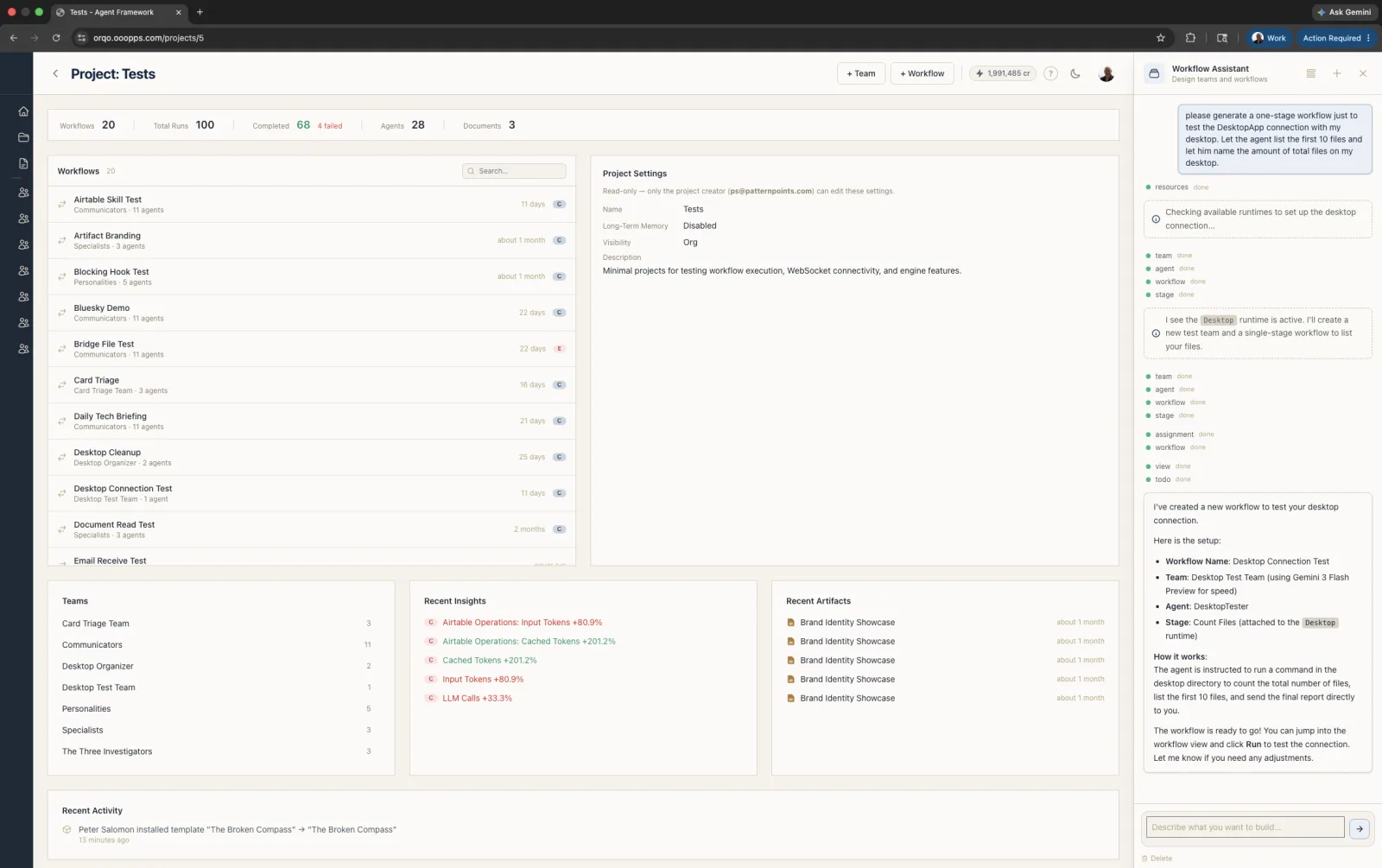
Alternative: Build from Scratch
If you prefer to start with a blank slate:
1. Create a Project (or use an existing one)
Go to Projects and create a new one — or open an existing project if you already have one. For a new project, give it a name and description that reflect your goal.
2. Build a Team with Agents
Inside your project, create a Team:
- Select an LLM configuration — platform-provided configs are available out of the box, backed by ORQO's platform credits. No need to bring your own API key.
- Add one or more Agents with descriptive roles (e.g., "Researcher", "Writer").
- Optionally assign Skills to agents if they need tool access.
3. Create and Run a Workflow
Still inside the project, create a Workflow:
- Assign it to your Team.
- Add Stages — each with a task description and agent assignments.
- Click Run to execute the workflow.
Monitor progress on the workflow run page. Each stage shows its status and result as the agents work through the sequence.
Platform Credits vs. Your Own Keys
Every ORQO subscription includes a pool of platform credits that cover LLM usage out of the box. When you use a platform-provided LLM configuration, each LLM call deducts from your credit balance based on actual token usage. You can monitor your balance and top up credits anytime from Settings → Billing.
When credits run low, you have two options:
- Top up credits — add more balance from the billing page.
- Bring your own API key — add your own provider credential (OpenAI, Anthropic, etc.) under Settings → Credentials and create a custom LLM configuration that uses it. This bypasses platform credits entirely — you pay the provider directly.
What's next?
- Projects — Organizing your work.
- Teams & Agents — Configuring agents, their tools, and LLMs.
- Workflows — Designing multi-stage execution pipelines.
- Credentials — Managing API keys and secrets.