Subagents
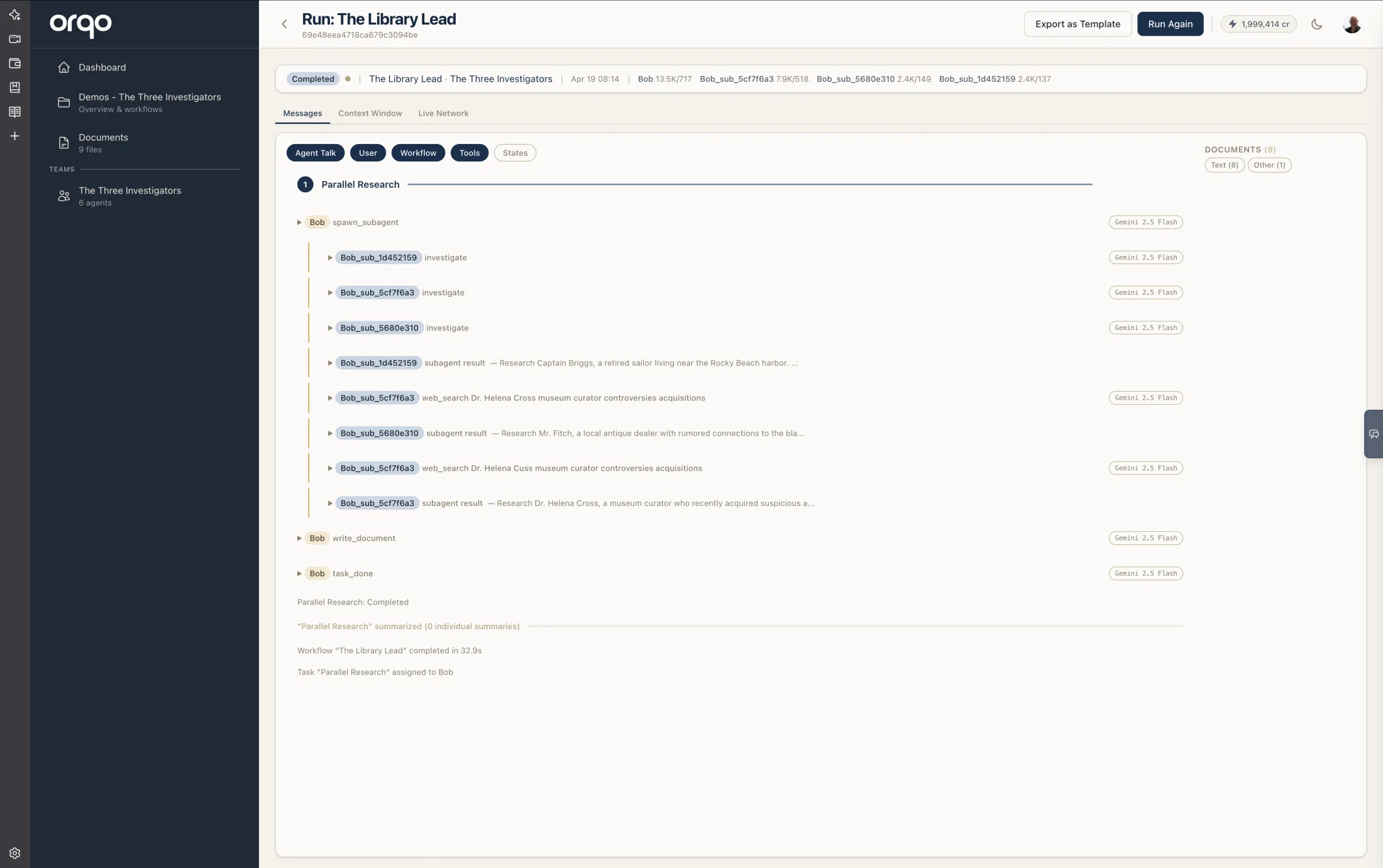
A subagent is a lightweight task runner that an agent spawns to handle focused work in the background. Unlike full agents that participate in team conversations, subagents are isolated workers: they execute a directive, use tools, and report results back to the parent — then they're done.
The key power of subagents is parallelism. An agent can spawn multiple subagents in a single action, and they all run simultaneously. The parent waits until every subagent finishes, then receives all results at once.
How Subagents Work
- An agent with the Spawn Subagents capability decides it needs parallel work done.
- It spawns one or more subagents, each with a specific directive (instruction).
- Each subagent runs in its own thread with its own LLM calls and tools.
- The parent blocks until all subagents complete — but other agents in the stage continue working.
- Results from all subagents are delivered back to the parent, which resumes its turn.
Agent "Analyst" is working
  → Spawns 3 subagents:
    → Subagent 1: "Research market size for segment A"
    → Subagent 2: "Research market size for segment B"
    → Subagent 3: "Research market size for segment C"
  → All three run in parallel, each using web search tools
  → Analyst waits...
  → All three complete and report back
  → Analyst synthesizes the three reports into a unified analysis
What Subagents Can and Cannot Do
They can:
- Use all of the parent's ToolFactory tools and MCP tools (automatically inherited)
- Make multiple LLM calls and chain tool use within their execution
- Trigger other workflows — enabling the Swarm Pattern
They cannot:
- Communicate with other agents on the team
- Spawn their own subagents (no recursive spawning)
- Access the team conversation or stage data
- Run indefinitely — each has a timeout (default: 60 seconds, max: 30 minutes)
Subagents are intentionally limited. They do one job, report results, and disappear. This isolation is what makes them safe to run in parallel — they can't interfere with each other or with the team conversation.
Enabling the Capability
Enable Spawn Subagents on an agent's stage assignment in the Workflow Builder. The capability icon appears on the assignment node when enabled.
See Assignments for the full list of capabilities.
Tool Inheritance
Subagents automatically inherit the parent agent's ToolFactory tools and MCP tools. You don't need to configure tools separately for subagents — they use whatever the parent has available.
If the parent has web search, file reading, and API tools, every subagent it spawns gets those same tools. You can optionally restrict which tools a subagent receives if you want it focused on a subset.
Timeout
Each subagent has a timeout that controls how long it can run before being automatically terminated:
| Setting | Value |
|---|---|
| Default | 60 seconds |
| Minimum | 10 seconds |
| Maximum | 30 minutes |
The agent chooses the timeout when spawning subagents. For simple tool calls, the default is usually sufficient. For subagents that trigger workflows (see below), increase the timeout to allow the triggered workflow time to complete.
The Swarm Pattern
The most powerful use of subagents is combining them with Workflow Triggering. A subagent can trigger a full workflow — meaning one agent can dynamically spin up multiple independent multi-agent workflows running in parallel.
How it works
- An agent spawns N subagents, each with a directive to trigger a specific workflow.
- Each subagent triggers its workflow and blocks until it completes.
- Each triggered workflow runs its own full multi-stage pipeline with its own team.
- When all triggered workflows finish, the subagents report their results back to the parent.
- The parent synthesizes all results.
This is dynamic swarm orchestration — the agent decides at runtime how many workflows to launch and what each should do.
Example: Competitive Intelligence
You have two workflows in the same project:
- "Competitor Research" — A 3-stage workflow: web research, analysis, report generation. Runs a team of 3 agents.
- "Competitive Intelligence" — The coordinator workflow.
The Competitive Intelligence workflow has one stage with a coordinator agent. Its task directive says: "Read the competitor list and research each competitor in parallel."
Workflow: "Competitive Intelligence"
  Stage: "Research All Competitors"
    Agent "Coordinator" reads the competitor list
      → Spawns 5 subagents (one per competitor), each with directive:
        "Trigger the 'Competitor Research' workflow for [competitor name]"
      → Each subagent triggers "Competitor Research"
        → That workflow runs 3 stages:
          Stage 1: Web Research (2 agents search and collect data)
          Stage 2: Analysis (1 agent analyzes findings)
          Stage 3: Report (1 agent writes the research report)
        → Subagent receives the completed report
      → All 5 subagents report back simultaneously
      → Coordinator synthesizes all 5 reports into a unified analysis

  Stage: "Executive Summary"
    Agent "Strategist" writes the final competitive brief
That's 20+ agents working across 15+ stages in 5 parallel workflows — all triggered by one workflow with one click.
Requirements
For the swarm pattern to work, the agent needs both capabilities enabled on its assignment:
| Capability | Why |
|---|---|
| Spawn Subagents | To create the parallel subagents |
| Trigger Workflows | So that the capability is inherited by subagents |
The agent's task directive should instruct it to use this pattern. The agent decides how many subagents to spawn and what each should research — this is a runtime decision, not something you configure in advance.
Timeout considerations
When subagents trigger workflows, increase the subagent timeout to account for the triggered workflow's execution time. A multi-stage workflow might take several minutes. Set the subagent timeout to at least match the expected workflow duration, with some buffer.
Depth limits
The existing recursion depth limit of 3 applies to triggered workflows. This prevents infinite chains but allows plenty of composition depth for practical use cases.
Subagents cannot spawn their own subagents, so the chain is always: agent → subagent → triggered workflow. The triggered workflow's agents can trigger further workflows (up to the depth limit), but they cannot spawn subagents that spawn more subagents.
Subagents vs. Other Composition Patterns
| Pattern | Parallelism | Scope | Duration | Use when |
|---|---|---|---|---|
| Subagents | Yes — N parallel | Single focused task per subagent | Seconds to minutes | Quick parallel research, data collection, independent subtasks |
| Subagents + Workflow Triggering (Swarm) | Yes — N parallel workflows | Full multi-stage pipeline per subagent | Minutes | Dynamic parallel orchestration of complex, independent processes |
| Workflow Triggering (direct) | No — sequential | Full workflow, agent blocks | Minutes | One agent needs results from one other workflow |
| Multiple agents in a stage | Yes — round table | Collaborative conversation | Varies | Agents need to discuss, debate, or build on each other's work |
| Outcome routing | No — branching | Different stage paths | Varies | Deterministic decisions about which path to follow |
The swarm pattern is uniquely suited for tasks where the same process needs to run independently against multiple targets — competitor research, multi-market analysis, parallel data collection, batch processing of documents, or any "do this N times with different inputs" scenario.
Related
- Assignments — Where you enable the Spawn Subagents capability
- Workflow Triggering — How triggered workflows work
- Communication Flow — How agents communicate within a stage