Skills
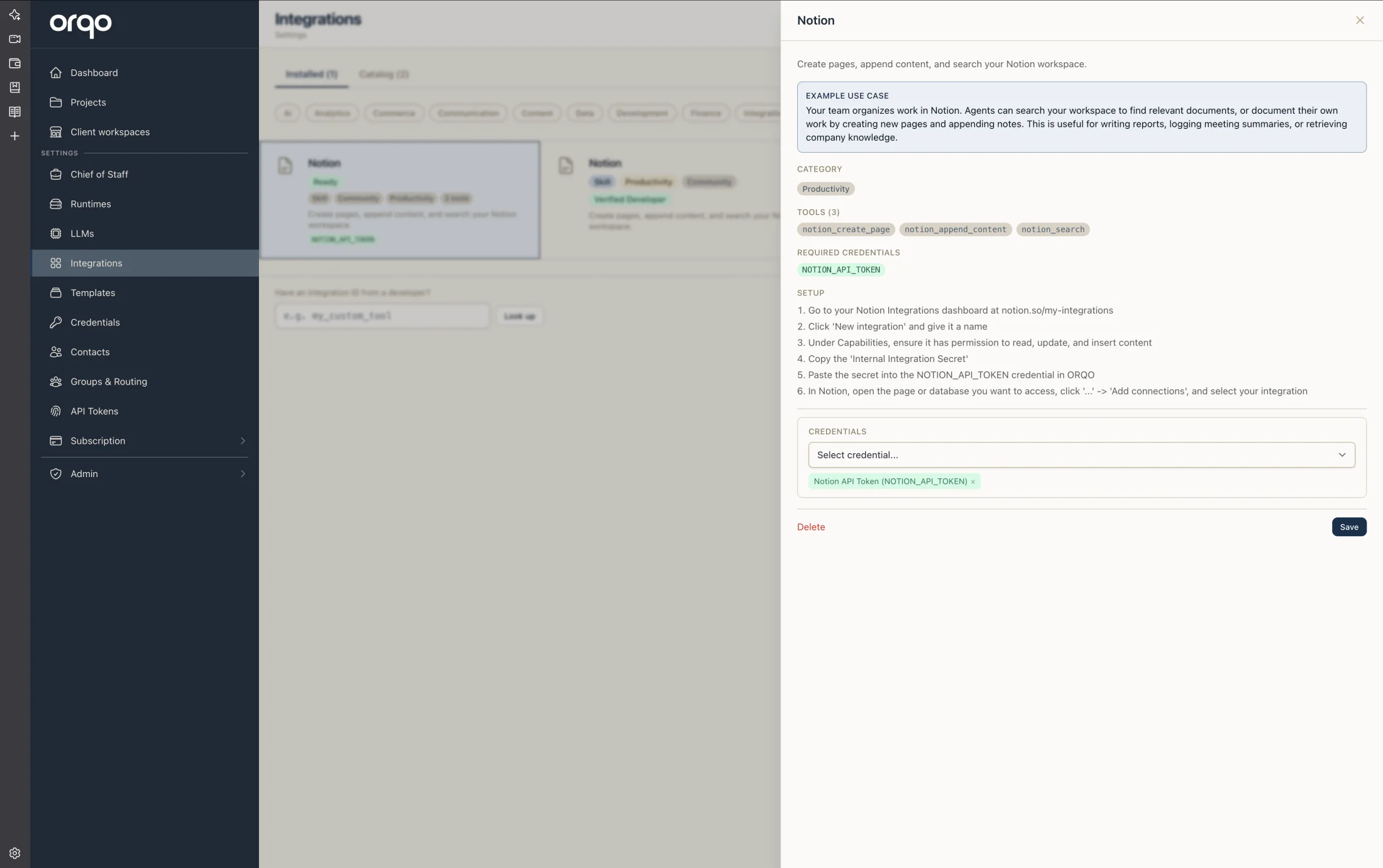
A skill is a reusable package that bundles tools, credentials, knowledge, and an optional runtime into a single assignable unit. Instead of configuring individual tools and API keys on every agent, you create a skill once and assign it to any agent that needs those capabilities.
What a Skill Bundles
Each skill is a self-contained capability package with up to five components:
| Component | Description |
|---|---|
| Tools | A list of tool names from the platform's tool library. These are the actions the skill provides (e.g., web_search, read_file, github_create_issue). |
| Credentials | API keys and secrets required by the skill's tools. Assigned via credential assignments. |
| Knowledge | A text block of domain knowledge injected into the agent's context when the skill is active. Use this for instructions, reference data, or behavioral guidelines specific to the skill. |
| Runtime | An optional runtime environment (e.g., a sandboxed Python container) required by tools that execute code. |
| App | An optional link to an installed App, connecting the skill to an external service's adapter and channels. |
Skills vs. Stage Tools
Understanding the difference between skills and stage tools is key to building effective workflows.
Skills are the agent's general capabilities — the expertise it brings to every task, regardless of context. Think of it like hiring an employee: a researcher you hire knows how to search the web and read documents. That's their professional skillset. You assign these skills once in the Team Builder and they stay with the agent across all stages.
Stage tools are task-specific instruments — tools an agent needs only for a particular stage. A researcher might need access to a GitHub API in one stage to gather issue data, but not in the next stage where they're writing a summary. Assigning tools at the stage level (via Assignments) keeps agents focused and avoids overloading them with irrelevant capabilities.
| Skills (on the Agent) | Stage Tools (on the Assignment) | |
|---|---|---|
| Configured in | Team Builder | Workflow Builder (assignment) |
| Scope | All stages the agent participates in | One specific stage only |
| Analogy | Education and expertise an employee brings when hired | Specific equipment handed out for a particular task |
| Example | Web search, code execution | GitHub API for a data-gathering stage |
Start with skills for the core capabilities that define the agent's specialty. Add stage tools only when a specific stage requires something the agent doesn't normally need.
Assigning Skills to Agents
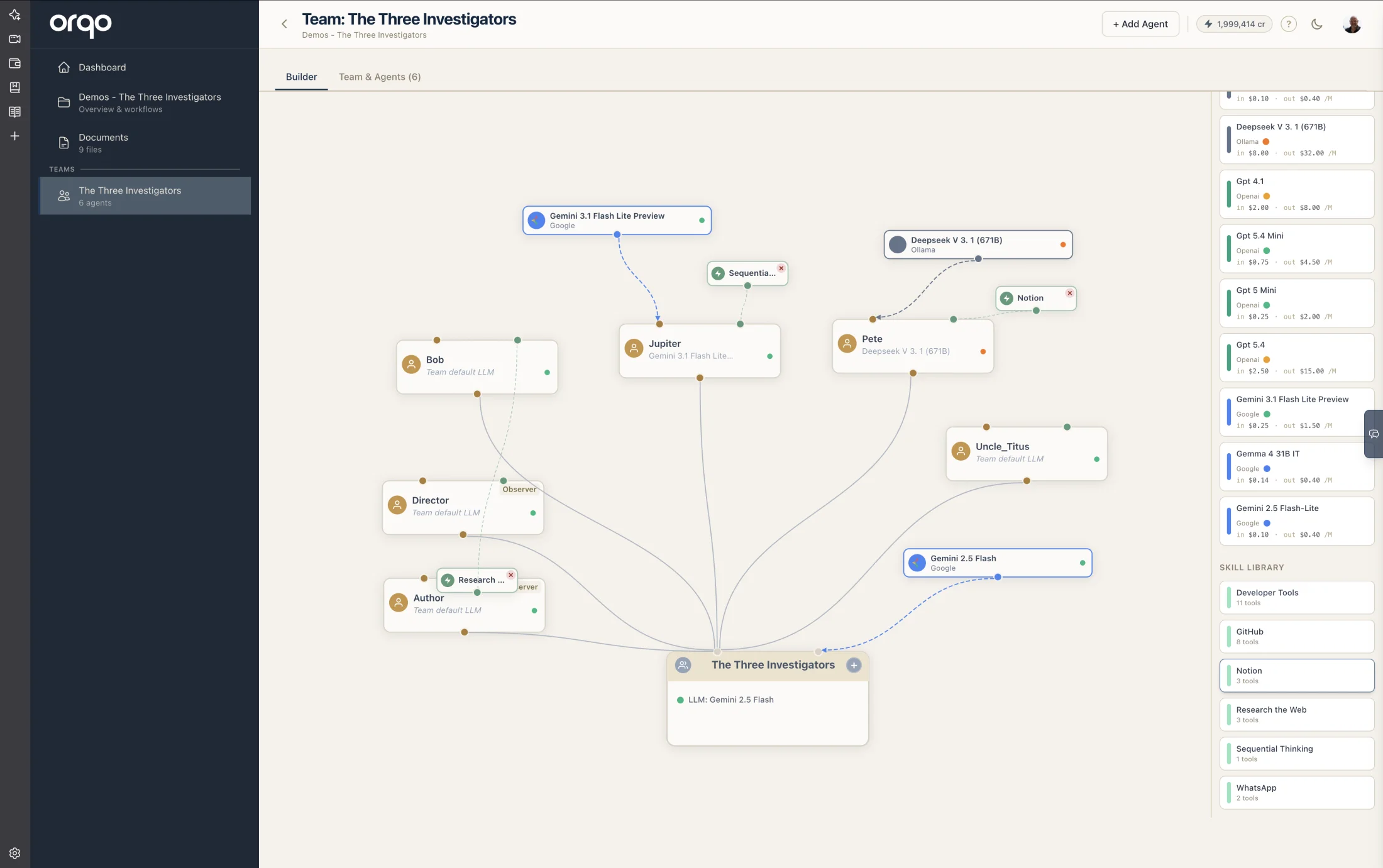
Skills are assigned to agents through the Team Builder or the agent edit form. When you assign a skill to an agent, the agent gains access to all of the skill's tools during workflow execution.
In the Team Builder, drag a skill card from the sidebar palette onto an agent node. The visual graph shows skill nodes connected to their assigned agents via dashed links. To remove a skill assignment, click the "x" button on the skill node.
An agent can have multiple skills assigned. The tools from all assigned skills are merged into the agent's available tool set.
Skills are scoped to the organization. Any agent in any team within the organization can be assigned any of the organization's skills.
Platform Skills vs Custom Skills
Skills come in two varieties:
Platform Skills
Platform skills are pre-built by the platform and available to all organizations. They bundle commonly needed capabilities like web search, file operations, or code execution.
- Locked platform skills are auto-installed for every new organization and cannot be deleted or modified. They provide core capabilities that the platform expects to be available.
- Unlocked platform skills are pre-built but can be customized or removed by the organization.
Platform skills are identified by a unique key and marked with a "Platform" badge in the UI.
MCP-Linked Skills
When you connect an MCP server, ORQO automatically creates a linked Skill that bundles all the server's discovered tools. These skills:
- Appear on the Integrations page and in the Team Builder's skill library
- Stay in sync with the MCP server — when tools are added or removed during re-discovery, the skill's tool list updates automatically
- Show a link to the MCP server's settings page for connection management
- Are deleted when the MCP server is removed
Catalog MCP servers (e.g., Brave Search, GitHub) create platform skills with read-only tools. Custom MCP servers create editable skills.
Custom Skills
Custom skills are created by the organization to package project-specific or domain-specific tool sets. For example, you might create:
- A "GitHub Operations" skill bundling
github_create_issue,github_list_repos, andgithub_create_prwith a GitHub API token credential. - A "Data Analysis" skill bundling
read_csv,run_sql, andgenerate_chartwith a database credential and a code execution runtime. - A "Content Publishing" skill bundling tools from an installed CMS App with editorial guidelines as knowledge.
Custom skills can be freely edited and deleted.
Skill Components in Detail
Tool Names
Each skill lists the tools it bundles. Tools must exist in the platform's tool library or as discovered MCP server tools. The skill card shows the count of bundled tools.
In the skill editor, tools are organized into category tabs displayed as a scrollable pill strip. Built-in categories (Filesystem, Shell, Git, Web, Communication, Knowledge, Integrations, Documents, Data) appear alongside dynamic tabs for each connected MCP server (e.g., "Slack", "Brave Search"). Within each tab, individual tools are toggled on or off with a switch control. For app-owned skills, only tools from the linked App's MCP server are shown.
Credential Requirements
Skills track which credentials their tools require. The platform automatically detects requirements and surfaces a checklist:
| Status | Meaning |
|---|---|
| Satisfied | The required credential is assigned to the skill |
| Missing | A required credential has not been assigned yet |
Unsatisfied credential requirements are surfaced as warnings in the skill card. Tools that require missing credentials will fail at runtime.
Knowledge
The knowledge field is a free-text block that gets injected into the agent's context when the skill is active. Use it for:
- Domain-specific instructions ("When searching for academic papers, prefer peer-reviewed sources and cite DOI links")
- API usage guidelines ("The GitHub API has a rate limit of 5000 requests/hour -- batch operations where possible")
- Behavioral constraints ("Never modify the main branch directly -- always create a feature branch")
Runtime
Some tools require a sandboxed execution environment (e.g., running Python code, executing shell commands). You can link the skill to a configured runtime. If a skill includes tools that require a runtime but none is assigned, the skill shows a "missing runtime" status.
Runtime status values:
| Status | Meaning |
|---|---|
| Not needed | None of the skill's tools require a runtime |
| Satisfied | A runtime is assigned and currently running |
| Missing | Tools require a runtime but none is assigned |
| Not running | A runtime is assigned but the container is not active |
Status Badges
The skill card in the UI displays status badges that give a quick health overview:
- Tool count -- "3 tools" indicating how many tools the skill bundles.
- Credential count -- "2 credentials" showing assigned credentials.
- Runtime indicator -- "1 runtime" if a runtime is linked.
- App link -- "app: Slack" if connected to an installed App.
- Requirement warnings -- Red badges for missing credentials or runtimes.
Field Reference
| Field | Required | Default | Description |
|---|---|---|---|
| Name | Yes | -- | Unique display name within the organization |
| Description | No | -- | What the skill does and when to use it |
| Category | No | -- | Grouping label (e.g., "search", "code", "communication") |
| Icon | No | Puzzle piece | Icon shown on the skill card |
| Tools | No | None | Tools bundled with this skill |
| Knowledge | No | -- | Domain knowledge injected into agent context |
| Runtime | No | None | Execution environment for tools that run code |
| App | No | None | Link to an installed App |
| MCP Server | No | None | Link to a connected MCP server (auto-set when MCP server creates the skill) |