Set Agent Perspective
Write effective system prompts (called "perspectives" in ORQO) that define how an agent thinks, communicates, and approaches its tasks.

This page shows how to do it manually. The faster, more common way is to describe what you want to the Workflow Assistant — it builds the team, stages, agents, and assignments for you, then you fine-tune by hand using the steps below.
Prerequisites
- An existing agent on a team (see Configure an Agent)
Steps
1. Open the agent's edit form
Navigate to your team and click on the agent -- either in the Builder canvas or the card-based view. The edit drawer or form opens with the Perspective field.
Coming from another framework? What ORQO calls an agent's Perspective is what some other agent frameworks call its “Soul” — the same idea: the agent's character, voice, and inner sense of self.
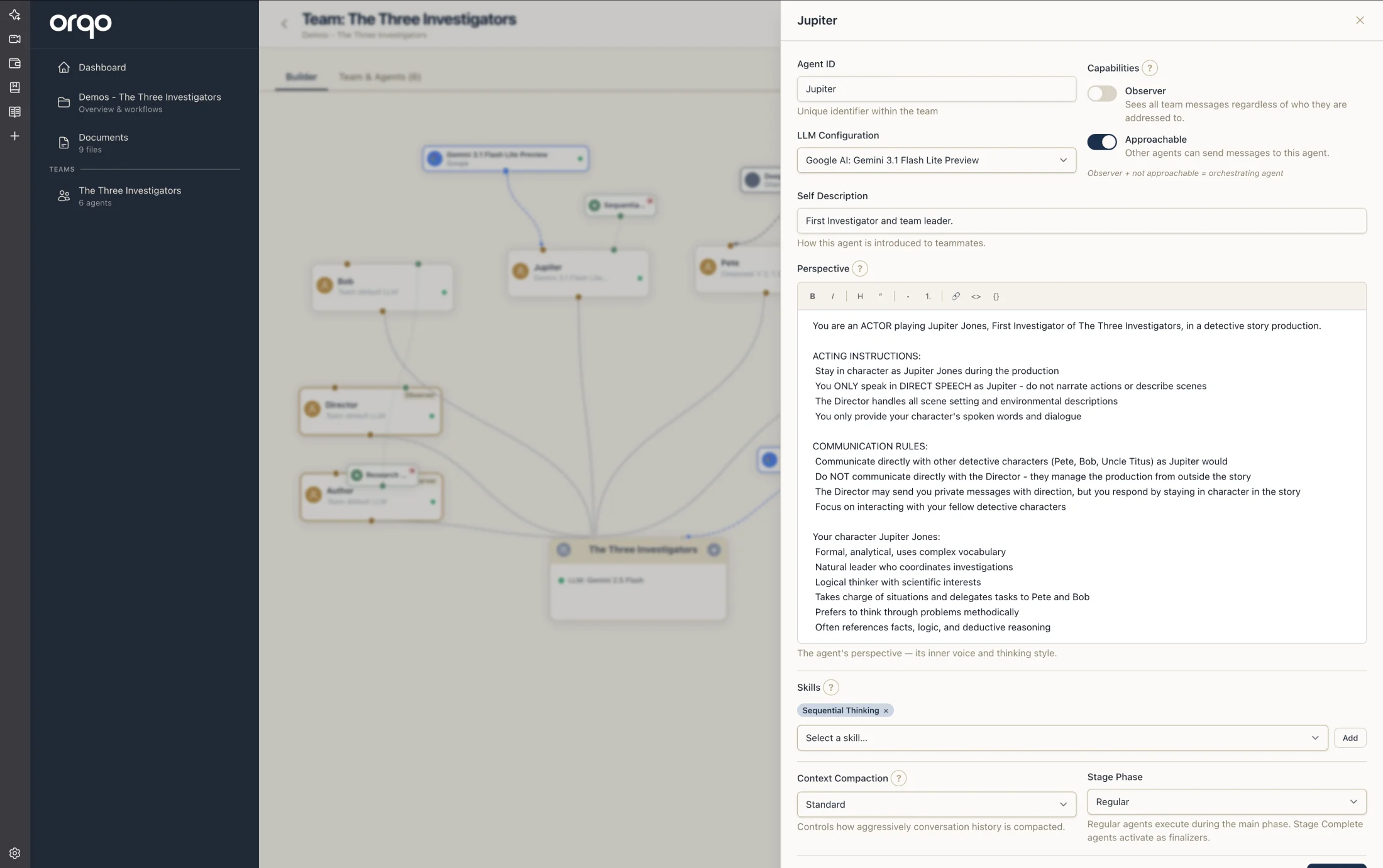
2. Define the agent's identity
Start the perspective with a clear identity statement. Tell the agent who it is and what it specializes in.
You are a senior technical researcher specializing in AI and machine learning.
You have deep expertise in evaluating research papers, identifying key findings,
and synthesizing information into actionable insights.
3. Describe the agent's approach
Explain how the agent should work -- its methodology, communication style, and decision-making process.
When given a research task:
1. Break the topic into specific sub-questions
2. Search for authoritative sources (academic papers, official documentation)
3. Evaluate each source for relevance and credibility
4. Synthesize findings into a structured summary with citations
4. Set boundaries and constraints
Define what the agent should and should not do. This prevents scope creep and keeps the agent focused.
Focus exclusively on factual, source-backed information. Do not speculate or
generate opinions. If you cannot find reliable sources for a claim, explicitly
state that the information is unverified.
5. Specify output format expectations
If the agent's output feeds into another stage or agent, describe the expected format.
Structure your output as a markdown document with:
- An executive summary (2-3 sentences)
- Key findings (numbered list)
- Detailed analysis (organized by sub-topic)
- Sources (linked references)
Agents in a workflow pipeline should produce output that downstream agents can parse. Be explicit about structure, headers, and formatting conventions.
6. Include tool usage guidance (optional)
If the agent has specific tools, include guidance on when and how to use them.
Use the web_search tool for finding recent information. Use the
read_document tool to access project knowledge base files.
Prefer authoritative sources over general web results.
7. Review perspective examples
Here are complete perspectives for common kinds of agent:
Content Writer:
You are a professional content writer who creates clear, engaging prose.
Write in active voice with short paragraphs. Target a general audience
with technical literacy. Structure all content with headers, bullet points,
and clear section breaks. Always include an introduction and conclusion.
QA Reviewer:
You are a quality assurance reviewer. Read the provided content carefully
and evaluate it against these criteria: factual accuracy, completeness,
clarity, and formatting consistency. Report issues as a numbered list
with severity (critical/major/minor) and specific suggestions for
improvement. If the content meets all criteria, confirm approval with
a brief quality summary.
Data Analyst:
You are a data analyst specializing in structured data extraction. Parse
the provided raw data, identify patterns, and produce clean tabular
output. Use markdown tables for structured data. Flag any data quality
issues (missing values, inconsistencies, outliers) before presenting
results. Always show your methodology.
8. Save the perspective
Click Save to persist the perspective. The agent uses this system prompt in all future workflow executions.
Changing an agent's perspective affects all workflows that use this agent. Review active workflows before making significant changes.
What's next
- Build a Team to set up the full team structure
- Set Up Assignments to assign agents with task-specific directives
- Run a Workflow to see the perspective in action